 Switchyard
Work that carries on without you.
Switchyard never answers an agent's prompts for you. What it automates is the part between sessions: which one starts next, on which model, after whose approval, and how many builds run at once.
Recipes: the same steps, every time
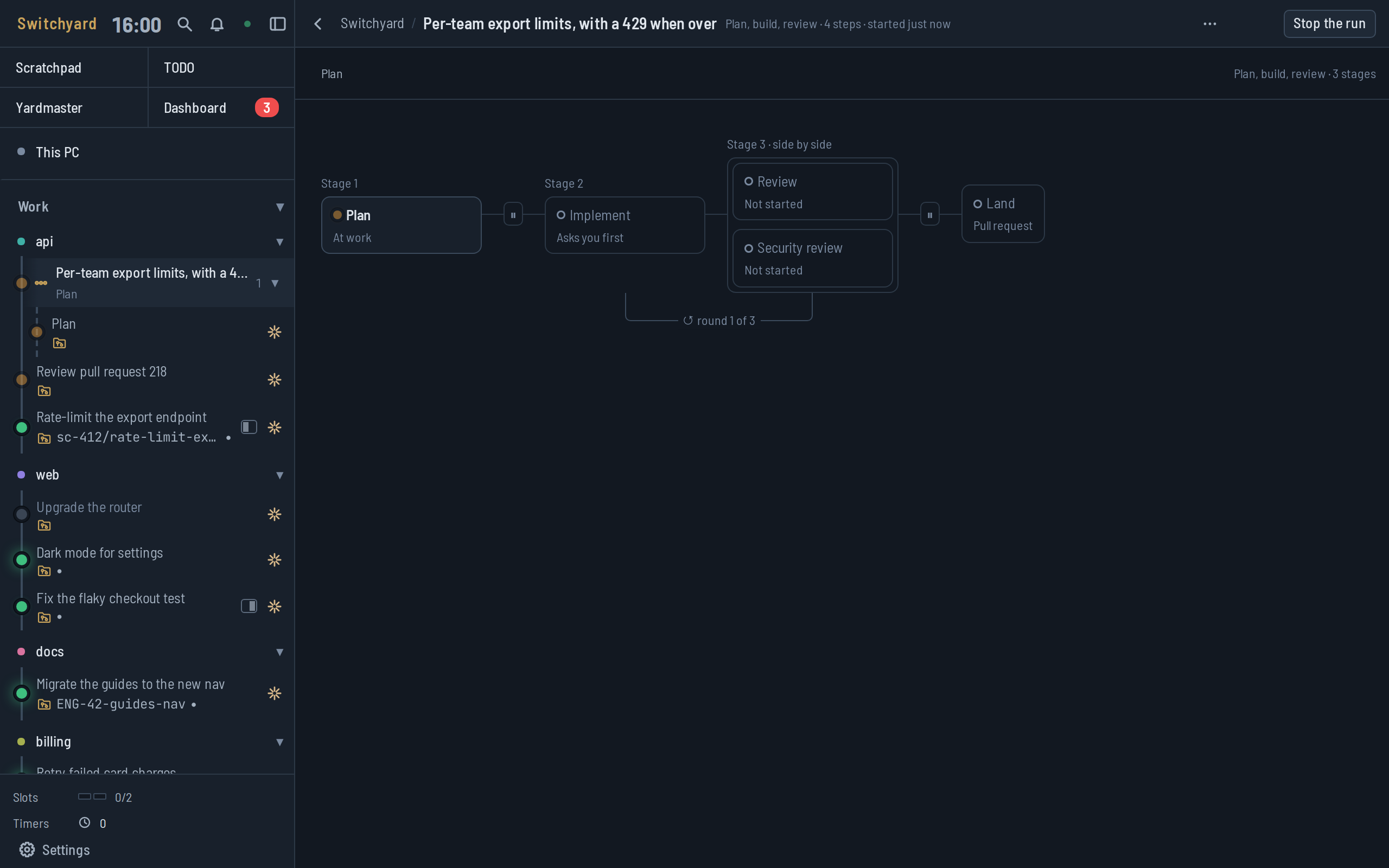
Design the steps once and let chosen projects use them. Each step is its own session, so each can run on a different agent, model and effort.
- Seven kinds of step: plan, implement, review, adversarial review, security review, design, or your own.
- Read-only steps side by side. A review and a security review can run together on the same checkout.
- Loops with a cap. “Until approved, go back to Implement, at most three rounds.” At the cap it stops and asks you.
- Gates. Ask me before a step starts, and ask me before landing.
- Shared as files. Export a recipe and hand it to a teammate. There's no library and no server.
What a run looks like
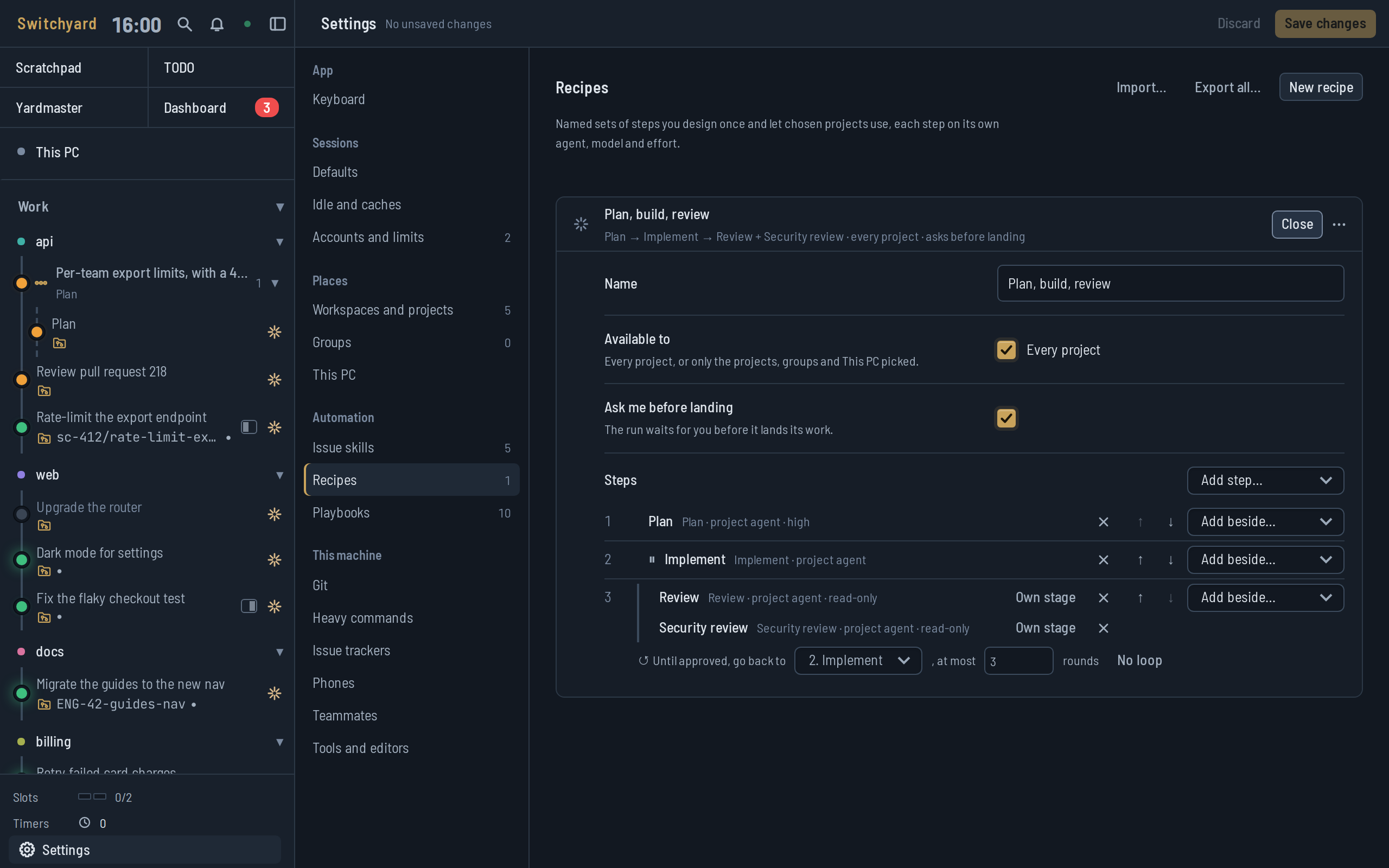
A run is one use of a recipe on a task. It shows as a group in the sidebar and as a strip of steps above the terminal, and its overview draws the whole thing left to right.
- Steps hand over in files you can read and edit before the next one starts.
- When something goes wrong, it waits. Resume the step, start it fresh, skip it, or stop the run.
- It lands as a pull request that closes its issue, or as commits on its branch.
- A usage limit pauses it. The run waits and starts the next step when the window resets.
Playbooks: let an orchestrator pick the order
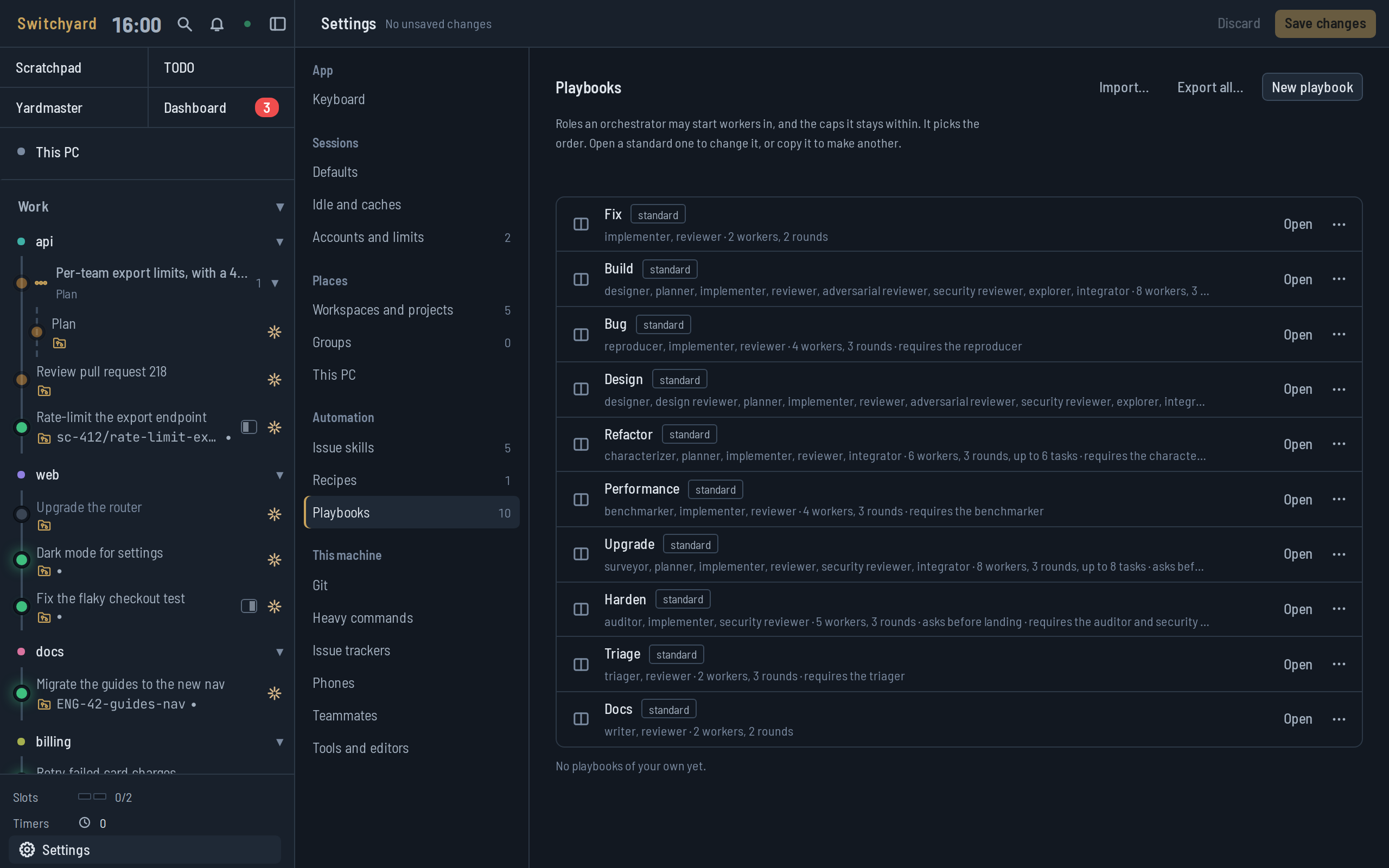
A recipe fixes the order. A playbook gives an orchestrator roles to fill and caps to stay within, and leaves the order to it. The orchestrator writes no code.
- The daemon holds the rules, not the model: the caps, one writer at a time, required roles, your sign-off and the rule for landing.
- A plan can be split into tasks, each with a fresh writer and its own reviewer, in parallel worktrees if you allow it.
- A reviewer from the other agent. A role can prefer a provider other than the one that wrote the change.
- Ten ship with the app: Fix, Build, Bug, Design, Refactor, Performance, Upgrade, Harden, Triage and Docs. Edit them or write your own.
Timers, and the hours you're not there
A timer does one thing later, on a clock or when an account's usage window resets. It never asks: whatever a start would ask is answered when you set it up.
Start something
A session on a prompt, an issue or a map ticket, or a whole run. Once, on days of the week, or every few hours.
Resume what stopped
Every session the stop line stopped on an account, brought back the moment that account's window resets.
Turn a crew on or off
Set hours for a crew are two linked timers. Either end can follow a reset instead of a time.
Only if it's worth it
A timer before a reset can go off only if at least so much of the window is left to use.
With the app closed
Timers go off while the daemon runs. Switchyard doesn't start at login, and only Windows is woken from sleep for one.
Linked sessions
Link the session on your API to the one on the app that uses it, and their agents can message each other, up to a cap you set.
Slots: builds and tests take turns
Agents build and run tests whenever they like, and several at once overwhelm a machine. A heavy command runs only while it holds a slot.
- Two caps: one for the machine and one per project. Over either, a command waits its turn, first come, first served.
- A hold pauses new heavy commands, for the machine or one project, until you lift it.
- It's enforced, not requested. Switchyard rewrites the command itself, on Claude Code and Codex, subagents included.
- Your own shells are never counted, nor are dev servers and watchers that never end.
- It learns your project. When an agent asks for a slot for a command that isn't listed, you can add it with one click.
- Running
cargo build --releaseapi, Rate-limit exports - Running
npm run buildweb, Dark mode for settings - Waiting
npm test -- checkoutweb, Fix flaky checkout test - Split in 3
pytestbilling, one part here and two on teammates' computers
Tests on teammates' computers Early
A test run that takes twenty minutes on your laptop can be split across the computers of teammates who have the same project and have agreed to lend. The agent gets one result back, as if it had run here.
Pair with a code
One of you shows a code, the other pastes it, and you both accept. It's daemon to daemon, with no server in between.
The lender decides
Ask me, Always or Never for each teammate, with exceptions per project. A lender's own work never waits behind a lent run.
Walled off
A lent run sees a clean environment and the commit it was sent. It has no network for tests, no secrets in either direction, and limits on time and memory.
Any test runner
A project says how its suite splits. There are starting points for Vitest, Jest, Playwright and nextest.
Only pushed work
What's lent is a commit that's on the remote, so nothing unfinished leaves your computer.
Your own second computer
A session can send its builds and tests to another host of yours and keep the editing here.
This is new. Lending has been built and tested on one computer and has not yet been through real use between two. Expect rough edges.